

close
Choose Your Site
Global
Social Media
Views: 0 Author: Site Editor Publish Time: 2026-08-28 Origin: Site


Routine maintenance and off-season storage are never optional chores. They dictate the lifespan of an Electric robot lawn mower. Proper care protects your initial financial outlay year after year. Winter weather introduces severe threats to sensitive electronics. Freezing temperatures rapidly degrade lithium-ion batteries. Organic buildup also damages delicate ultrasonic and bump sensors. Left unchecked, these vulnerabilities invite premature hardware failure. This guide explores a strict, manufacturer-aligned cleaning and storage protocol. You will learn how to safeguard battery health before freezing sets in. We will show you how to dry-clean the chassis properly. You will also discover how to winterize your docking station safely. Mastering these specific steps ensures peak cutting performance when spring finally arrives.
Avoid moisture intrusion: Never use high-pressure washers unless the device carries a specific IPX5+ rating; dry brushing is the industry standard for undercarriage cleaning.
Optimize battery health: Lithium-ion batteries must be stored indoors at a 50–70% charge level in a dry, frost-free environment (ideally between 5°C and 20°C).
Protect the infrastructure: Charging stations and power supplies should typically be brought indoors, while boundary wires can remain buried if properly sealed at the exposed ends.
Inspection prevents degradation: Pre-storage is the optimal time to replace dull blades and inspect wheel treads to mitigate mechanical stress upon spring deployment.
Neglecting winterization turns a long-term automated landscaping investment into a recurring replacement cost. Smart lawn care devices rely on precision engineering. They require stable environments during months of inactivity. Leaving units outside exposes them to rapid temperature fluctuations. Moisture easily penetrates the outer shell. Condensation forms on the motherboard overnight. This completely destroys internal circuits over a single winter. Proper storage stops this financial bleed immediately.
Lithium-ion batteries are highly vulnerable to extreme cold. Parasitic drain occurs naturally during storage. Cells left at a zero percent charge in freezing temperatures suffer catastrophic damage. The internal chemistry breaks down permanently. You will experience irreversible capacity loss. A battery rated for four seasons might fail after just one. Replacing these advanced battery packs is expensive. Protecting cell health during winter saves you substantial money.
Most manufacturers strictly enforce warranty terms regarding storage. They explicitly void warranties if they detect water damage. Improper cleaning methods often trigger these clauses. Freeze damage from outdoor winter storage also nullifies your protection. Service centers use internal diagnostic logs to check battery temperatures. They can easily verify if a unit froze. Adhering to official storage guidelines keeps your warranty fully intact.
Financial Impact of Storage Methods
Storage Method | Battery Health Impact | Hardware Risk Level | Warranty Status |
|---|---|---|---|
Indoor Climate-Controlled | Maintains optimal capacity | Low (Zero freeze risk) | Fully Valid |
Unheated Outdoor Shed | High risk of deep discharge | Moderate (Condensation risk) | At Risk |
Left Outdoors / Plugged In | Irreversible cell degradation | High (Surge & water damage) | Voided |
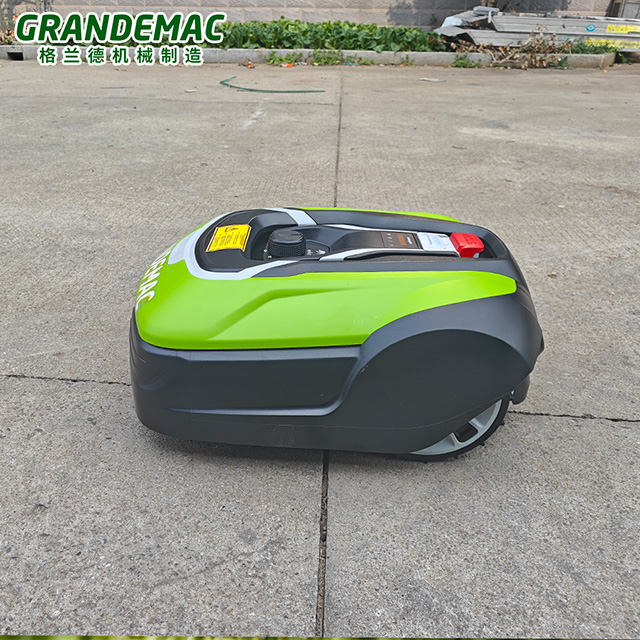
You must prioritize safety before inspecting the undercarriage. Complete a full system power down first. Remove the safety key immediately. Some models use a dedicated battery isolator switch instead. Turn this switch to the off position. This prevents accidental motor engagement. Exposing the cutting disk is dangerous. Always wear thick, cut-resistant gloves during this process.
Moisture intrusion ruins automated mowers. Dry brushing remains the safest cleaning method. Use coarse nylon brushes to remove dried grass. You can also use compressed air. Keep the air pressure under 30 PSI to prevent seal damage. Focus on the wheel treads and cutting deck.
Water poses a massive risk to moving parts. Using a hose forces organic matter deeper into wheel bearings. It pushes grit past the cutting motor seals. This creates severe friction points. Dry cleaning completely avoids these mechanical risks.
Charging contacts require specific attention before storage. Oxidation prevents proper charging in the spring. Wipe all metal contacts carefully. Use a fine-grit emery cloth for stubborn corrosion. You can also apply a specialized electronic contact cleaner.
Sensors require a much gentler approach. Never use abrasive materials on optical lenses. Ultrasonic and rain sensors scratch very easily. Wipe them gently using a damp microfiber cloth. Dry them immediately afterward. Clear sensors ensure accurate navigation upon redeployment.
Pre-storage is the perfect time for blade inspection. Dull blades tear grass rather than cutting it cleanly. Evaluate the cutting edges closely. Look for deep nicks or heavy rust. You must determine if blades need cleaning, rotating, or replacing.
Remove the mounting screws carefully.
Wipe the cutting disk down to remove acidic grass sap.
Install fresh blades if the old ones show significant wear.
Always replace the mounting screws when installing new blades.
Replacing blades now prevents old rust from transferring to the cutting disk during storage.
Battery management defines your storage success. You must follow an exact charging procedure. Charge the unit to the recommended baseline before storage. This is usually around 70 percent capacity. Once it hits this target, turn the main power switch off.
Never store the unit at 100 percent charge. Holding maximum voltage stresses the internal cells. Likewise, never store it at zero percent. Deep discharge kills lithium-ion chemistry over a three-to-six-month period. Maintaining a partial charge stabilizes the battery for long-term hibernation.
Your storage environment matters immensely. You must specify a dedicated indoor space. The climate must remain consistently dry. It must also remain entirely frost-free. Ideal temperatures range between 5°C and 20°C. Basements and heated garages work perfectly. Avoid damp cellars or drafty outbuildings. Humidity corrodes exposed motherboard solder points over time.
The docking station requires its own winterization framework. You have several decisions to make here. First, always unplug the main power supply. Next, disconnect the perimeter boundary wires. Cap these wire connectors thoroughly. Use waterproof dielectric grease to prevent winter oxidation.
Implementation reality often differs from theory. Some brands claim their bases can stay outside. They sell specialized winter covers for this purpose. However, bringing the sensitive PCB components indoors is always the lowest-risk approach. Frost heaves can crack outdoor plastic housings. Storing the tower inside guarantees its survival.
Many users mistakenly use pressure washers for quick cleaning. High-pressure water easily breaches rubber gaskets. It floods the internal chassis instantly. This shorts the motherboard and ruins the drive motors. Unless explicitly rated otherwise, keep hoses away from your device.
Unheated garden sheds offer zero thermal protection. Freezing temperatures destroy battery cell chemistry. The electrolyte fluid inside the battery freezes and expands. This micro-fractures the internal cell structure. You will face a very expensive replacement bill come spring.
Never leave the unit docked all winter. Winter storms cause unpredictable power surges. These surges travel through the ground wire and fry the station. Furthermore, continuous docking causes unnecessary trickle-charge cycling. This silently wears out the battery lifespan.
People often remember the mower but forget the transformer. The external power supply box sits exposed. Failing to protect it from snow causes internal shorts. Standing water easily breaches the transformer casing. Bring the power supply indoors alongside the main unit.
Decaying grass is highly acidic. Storing a dirty mower traps wet debris against the chassis. This causes rapid, corrosive damage over the winter. It eats into cutting deck plastics. It also rusts critical metal screws. Always perform a thorough dry-clean before storage.
You should frame maintenance requirements as a core buying dimension. Older models require meticulous dry cleaning. Modern iterations offer better durability. If you hate cleaning, check the ingress protection specifications before buying. Lower maintenance requirements directly improve your overall ownership experience.
Understand the importance of Ingress Protection (IP) ratings. Modern models feature IPX5 ratings. This specific rating allows for low-pressure hose washing. It drastically reduces cleaning time compared to traditional dry-clean-only models. You can simply rinse the undercarriage off. This feature alone justifies upgrading for many busy homeowners.
Software now assists with off-season preparation. Look for models featuring app-based winter modes. These systems monitor battery health actively. Consider advanced units like the Optimow 15 Robotic Lawn Mower. They provide smart alerts regarding charge levels. The app guides you through the exact storage procedure step-by-step.
Always check a prospective model’s official maintenance manual first. Do this before finalizing any purchase. Ensure you have the necessary infrastructure ready. Verify you have adequate indoor space for winter storage. Confirm you understand the exact battery care requirements. Preparation prevents costly surprises down the road.
A disciplined cleaning and storage routine is an extension of your purchase decision. It actively protects your automation investment. Winter weather destroys neglected electronics quickly. Adhering to a strict protocol guarantees peak performance next season. We strongly advise purchasing an OEM-approved cleaning kit. Set a calendar reminder right now for mid-winter battery checks. If you are selecting a new device soon, review the product specifications carefully. Prioritize high IP ratings and smart battery chemistry for easier maintenance.
A: No. Leaving it outside exposes sensitive electronics to severe freezing risks. Freezing temperatures permanently destroy lithium-ion battery chemistry. Furthermore, temperature fluctuations cause internal condensation. This moisture easily shorts the motherboard. Always store the main unit indoors in a dry, climate-controlled space.
A: You do not need to dig up the boundary wire. Buried wires can safely remain underground all winter. However, you must protect the exposed ends at the docking station. Apply a generous coat of dielectric grease to the connectors to prevent rust and corrosion.
A: We recommend checking the battery status every two to three months. Turn the unit on briefly to verify the charge level. Ensure it has not dropped below 50 percent. If it has, recharge it to roughly 70 percent before turning it off again.
A: It depends entirely on the model's ingress protection rating. Standard models require dry brushing only; hoses will flood the motherboard. However, devices carrying a specific IPX5+ rating can be safely washed with a low-pressure garden hose. Always verify your model's rating first.


